It’s good to disable auto login in window xp if you share your PC with others. Once auto login is disable in window xp, it allow user to select their user profile at the login screen. There are few ways to disable auto login in window xp.
Method I: To disable auto login in window xp:-
Advertisements
- Click Start -> Run and type “control userpasswords2” and click OK
- a dialog box will appear and check “User must enter username and password to use this computer” checkbox and click OK
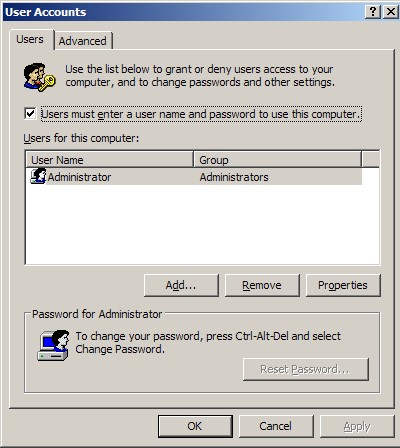
- Done, you have just disable the auto login in window xp. Restart your machine to take immediate effect.
If the first method does not work for you, you may try the method below
Method II: to disable auto login in window xp:-
- Click Start -> Run -> type “rundll32 netplwiz.dll,ClearAutoLogon” and click OK
- After you click OK, window xp will not show anything, this is just a process without any user interface.
- Done, you have just disable the auto login in window xp. Restart your machine to take immediate effect
Related posts:
Free 5 Licence keys for iOrgsoft PDF to Word Converter
How to type chinese character in Ms Windows? - Google PinYin
Free Sticky Notes Software for Windows - StickyPad
Enchance Your WinXP performance by disable error reporting service
How to open .mkv file in XP / Vista?
How to unlock attachment restriction in Ms Outlook
How to disable firewall in Microsoft Windows XP SP2
How to disable unread email notification in window xp login screen?
Share this with your friends:-

p.s. you can copy and past it in the “run” program so it is exact.
Thanks this really helped alot!
@matt did you try Click Start -> Run -> type “rundll32 netplwiz.dll,ClearAutoLogon†and click OK?
This was so helpful at my job since we had an ecore upgrade that log everybody in as an admin. automatically
I cannot disable autologon in XP at all, I have used each method, even this one:
in REGEDIT set AutoAdminLogon to 0, and clear the DefaultPassword ,
AutoAdminLogon is set to 0, and XP still automaticaly logon. Any idea?
it’s actually “control userpasswords2” …with an “s” ….password is plural