 By default, Mac already built in a way to convert doc to pdf. For those who always need to convert doc to pdf in Mac, you can easily perform the conversion without installing any software.
To convert doc to pdf in Mac OS X follow the steps below:-
Advertisements
- Open your doc file with your Text Editor (ex: Ms Word, TextEdit, Writer, Excel, Open Office etc)
- Click on File -> Print or Press Command + P
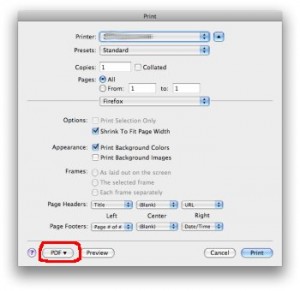
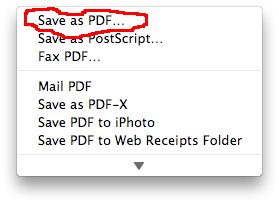
- Print Window will pop up, click on “PDF” button at the bottom left and select “Save as PDF …”
- Choose the location you wan to save the pdf file and click “Save”
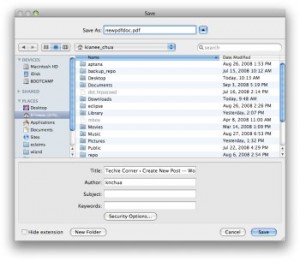
- Done, you just convert your doc to PDF file
** If you find the pdf file size big, then you might want to read my post about how to reduce pdf file size in mac os x
** This method is not only limited to convert doc to pdf, but also allow you to convert almost any file to PDF. **
Related posts:
How to search files by content in Mac / Linux
How to force quit program in Mac OS X
How to create shortcut in Mac OS X
How to find your MAC address in Mac and Window
How to change Dock icon size in Mac?
How to extract .bz2 file in Linux?
Arrow key not working in vi / vim - Mac OS
How to check if directory exists in Bash script
Share this with your friends:-

Thanks for interesting note.
Hi marcela, you can convert using the print function.
Just open the image with Preview, and click File -> Print
The print window pop up, click on the “PDF” button at the bottom left
and you can save it to anywhere you like.
Do you know any free program to convert Images to pdf for Mac 10.4? Thanks
thank you so much.
Hi,I followed the instructions but I have a different print window without the option on the left bottom.
What can I do?
Working in the middle of the desert in Mauritania and you save my life…. Thanks¡¡¡
Yes, this seems really great, I love it! I don’t know if you ever heard about amacsoft, I have used an app on it, it’s really helpful.
BLESS YOU! I have been searching for a FREE word-to-pdf converter online for my very old MAC OS X macbook for a while. I just happened to stumble across your web page today. Now I can turn in my English Comp project in the correct format. Thank you sooooooooooooo very much.
Thanks for showing this. Helped a lot, way better than using a software or uploading online.
Thanks dude that was pretty easy:-)
You can fix the problem of Microsoft Word-made PDFs reversing the page order. When in the “Print” window, go to “Microsoft Word” (in the drop-down menu under the Presets drop-down menu). Click on “Word Options”, and deselect “Reverse Print Order”, then press “OK”.
You can double-check the page order in “Quick Preview” on the main printing page.
For some reason, the options under “Paper Handling” regarding page order don’t seem to have any influence on the page order!
This worked for me in Word 2004; dunno about 2008.
Had no idea this existed. Mind = blown. Thanks!!
Thank you so much! This has really helped a lot.
thanks a lot:)
many thanks mate
thanks a lot.
when i do what is suggested, my footers get cut in half. how do i avoid this?
My problem with this tip is that my doc files always come out in reverse page order when converted to PDF. It does this regardless of what page order I chose in the print dialog box. (I’m using Mac OS MS 10.5.8 and Word 2004, if that makes any difference). Any suggestions on how to get the proper page order in my PDF files? I’m hoping for something a bit more convenient than manually cutting and pasting pages into reverse order in my Word document.
This is not flawless. It is easy to use for single page documents, but if you try to PDF a web page of data that would take up several pages, you will lose data at the page breaks.
thank you, nice solution
Thank you!!!!!! =D
Thanks a lot for the tips!!! helped me a lot.
omg thank you!<3
woooow!!!! coolest thing that has happened to me on the internet in forever!!! help that actually WORKS!!! THANKS:D
THANKS INFINITLY!!!!!!! MANY TIMES BEFORE I’VE TRIED UNSUCCESSFULLY TO FIND THE SOLUTION TO THIS… and CAN’T BELIVE HOW SIMPLY & EASILY WORKED!
THANK GOD YOU WERE HERE!!!
Thank you this was extremely helpful!
Hi, I am applying for a job at a local hospital, and they only accept .dco, .dox, .html files to upoad your resume. But every time i upload my resume the format is all messy, not like I have it originally. Any one know how to fix this?
Thank you
it works , thanks so much
Worked like a charm! Thank you very much for posting!!
Thanks alot!!! (y)(Y)
This is what worked for me: From within Word (I have Office for Mac 2004), select File, Print. At the bottom under the preview, there is a button that says PDF. Click that button and it gives you the option to save as a .pdf file. I tested it out and sure enough I had a new .pdf that looks exactly like the Word Document.
I tried what you suggested above: I opened a 1 page newsletter I created in Word with TextEdit, but you lose all of your formatting from MS Word. In Text Edit, my 1 page newsletter is several pages long and most of them blank. It looks nothing like my Word Doc. So thanks, but this didn’t help.
(For those wondering how to do this: hold down control key and click on file name. This brings up a box and click on “Open With…” and select “TextEdit”).
Hello – I have not been able to find any product that allows me to convert any MS Office document into PDF – with specific reference to documents that have multiple orientation, i.e. a Word doc that contains both landscape and portrait pages. Converting to PDF makes multiple PDF documents – can anybody help please?
Since about 1.5 years, when I save a Word document to pdf (either from the Print menu or the Save As menu), the resulting pdf file has the pages reversed! Therefore, when I convert a 70 page Word document, now I have page 70 as the first page in Adobe.
When I use Preview, I can reverse the pages in a small document by moving them up and down and then saving the file, but I can’t do that with large files for some reason.
Is there any way that I can reset this feature so that it no longer reverses pages?
Paul –
From all that I’ve read on the web, it is NOT possible to convert a Mac Word doc to Adobe PDF and retain the links. Un-flippin-believable.
As a purchaser of the expensive Adobe Acrobat Pro and Word 2011 for Mac, I simply cannot believe the temerity of both Adobe and Microsoft in selling us second rate versions of these products in the Mac world. I would never EVER have suspected that my switching to a Mac would mean losing this very critical functionality. And the companies don’t even have the decency to warn us. I NEED this function to convert WORD docs to PDF with the links intact! I feel duped.
Adobe, Microsoft: Get your act together and stop teeing off your customers that paid you well! Have you no shame?
Do you have any idea how to get active links in the Word documents? Ever since Adobe stopped supporting the “printer” and print toolbar, we have been unable to send links to PDF documents.
For some strange reason, every other word processor I have access to (Pages, Open Office, and NeoOffice) can create PDF documents with links and bookmarks, but now Microsoft Word.
This is an incredible problem when everyone is moving to electronic documents.
gezzzz….. I’ve been trying to download converters ,, some you have to purchase ,,, goodness me,,,, I never knew that there is a converter ,,, THANK YOU soooo much!!!!!!! but is there a way for the file in pdf to be changed ,, for example I want to send an invitation that I made and for the recipient to be able to add text or name ,,,…
Thanks! I had no idea I had this function on my mac. This info just made my life a lot easer and I would never have found it on my own.
Greatful cyberhugs
Hi, I did that, but the external hyperlinks in my document no longer work when converted to PDF. I mean, they’re still blue and underlined and everything, but I can’t click on them. They’re basically just text, not links. I can still click on them in Word, but not in the PDF I save it as.
thank you!!! actually this was a reminder of something, which i didn’t realize the importance of when i discovered it before, and so easily forgot it.
Thank you. Coming from a PC I was searching high and low for a PDF writer and because of your “techie corner” you saved me lots of unnecessary work
THANK YOU SO MUCH!!! (^_^) This was soo helpful!
When I converted my document in Word 2008 for Mac to a PDF, it saved it but when I try to open it, I get a box asking what I’m converting from, then when I click Microsoft Word, it gives me an error message saying “expected semicolon location 1”. ????????????? What in the world? Please help!
this was so great and easy. i luv apple for making everything easier!!!
Thank you SO SO much!!! I had the same section break problem and you’ve saved me a LOT of trouble!
Thank you! I can’t believe I’ve never noticed that button all these years!
When the above saving to pdf creates multiple documents, what you do is you open the first pdf in Preview in the mac. Then you open the next sequenced document. So if the first pdf is page 1 – 26.
And the second pdf is page 26-28, you drag and drop the 26-28 in preview into the first document after page 26 until all your document is in the correct order. Then save it again as a pdf once completed, and its now a complete document
Thank you so much!
Love my mac more and more each day, because of things like these, that they’ve set up for us. Someone at Mac is thinking logically and in terms of ease of use to set up the Mac so wonderfully.
We had an earthquake here recently in Chch, NZ. Was able to grab my Mac with ease, as everthing was there with it, no need to worry about anything but the screen, because all my work data was in the one simple machine, not several parts. Magic MAC. Hubby’s going to get one at home next time we buy a new computer.
thanks , thats was awesome , LOVE MY MAC
When I convert the word document on my mac to a pdf, the pages come out in reverse order. How do I avoid this. The pages are in the correct order in Word 2008 but reverse when I convert to a pdf.
Thank you so much! Very helpful!
I just want to say, I love you. Thank you
thanks a lot! much helpful
I’m sitting with the same problem as GaryZ – all the hyperlinks just desapear and I can’t find anything on Google. Can anybody help me?
I have the same problem as Kerrith (see previous comment). I have word Mac OSX and when I try to convert a word doc with multiple section breaks – it will create a pdf for each section instead of just one pdf file. It breaks the Word document into several short pdf files. What can I do?
thank you, you rock, such a dumb thing but so helpful!! thanks
Thank you I was sooooo happy to finally get my books into PDF format so quickly;)
THANK YOU;)
I downloaded the newest version of Adobe reader 9.3.3 and the ability to print and save as a pdf is not longer available. Any suggestions?
Re hyperlinks problem in Mac word.
You can’t! It will work for some links and not others.
You have to use either neo office (free) or pages. This continually frustrates the hell out of me and wastes so much of my time. I even have Acrobat Pro and you still can’t do this from a word document! Just nuts.
Thank You so Much!!! This is a great help!!!
When I convert my Word Doc to a PDf the background image is missing. It’s as though Acrobat doesn’t recognize the backgrounds I have in my Word documents. Help please!
is there a way to use automator to make the work flow easier since I have a bunch of documents to convert
i’m having the same problem with multiple sections: i get several pdf’s
how do i get one file??
(btw, solutions above don’t work)
thanks!
hmmm i havent try to use section before.
if you having Word 2004 and above in mac version,
u can try to save your file in pdf format.
Try this -> “File” -> “Save As” -> give a filename -> under “Format” select “PDF” and save!
Hi there,
I have word Mac:x and when I try to convert a word doc with multiple section breaks – it will create a pdf for each section instead of just one pdf file. Very frustrating!
For example I have the first 12 pages as text – then section 2 is landscape tables, third section is landscape figures. In all i have 5 section breaks…what do I need to do to get one pdf when I convert it under the print menu???
Dear all
thanks a lot.
It would be useful
I’m just beginner of computer science.
the information really helps.
Kind rgards ,
Kate
The links in my PDFs never worked … is there a way, or does one have to buy a professional converter?
I use the hidden-in-the-printer-menu converter on mac OS X and thought it was just to old for converting links – according to GaryZ an upgrade will not solve the problem?
Thanks for sharing – this is great!
It works very well as a file converter:
http://www.freefileconvert.com
I’m using Microsoft Office Word 2008 for Mac (.docx) and when I convert my resume to a PDF the hyperlinks no longer work.
How can I fix it so the hyperlinks work?
“save as” now (OS 10.6, earlier?, Text Edit 1.6) does the job.
I love you!
thank you so much!
I am so frustrated that they are hiding this in the print function and not the “save as” where I really thought it would be. You have saved me from so many head aches.
Nathan, you’re a legend!!! This is the coolest tip I found on this issue!
THANK YOU SO MUCH, this is perfect! Cheers from Australia
Nathan, Thank you, thank you thank you. My 380 k Word .doc that was converted to a bloated PDF of 2.4 MB was reduce to a 112k PDF file when I applied your advice!
Eres DIOS!!! GRACIAS MY FRIEND!
I had the problem with a 1.4mb word file becoming 10.8mb when published to pdf. The easiest way that i have found to solve this problem is to open the pdf in preview and then click on Save As, choose Reduce File Size from the Quartz Filter pop-up menu, and choose a name and location for the file. It now became 478kb from 10.8mb.
This is fine, but the problem I’m having that I cannot seem to resolve is that all of my Word doc formatting shifts in the conversion. My page numbers move from being an inch from the bottom of the page to being 1-1/2 inches from the page bottom. My headers shift from 2″ to greater than 2″ from the top of the page. Help!
I think the inbuilt pdf converter is hopeless. The files are always really big where I end up using my PC to convert to PDF.
You’ve been a great help.
The conversion works perfectly in Word 2008 for windows. Thank goodness I have a windows machine as well. The Mac version of office 2008 is not the same as windows even though they have the same name. It is very surprising that the pdf converter for the Mac is so poor; indeed converting to Word 2004 in the Mac, the formatted text changes. It seems that Microsoft has not done their job, yet again.
Thanks a lot! After searching and looking around other webs and programs this has been the best and easier solution I found!
Thanks for sharing.
Cheers from Spain.
Using word 2008 creates separate pdf if you have inserted section breaks or blank pages, I think. I converted my Word 2008 doc file back into Word 2004, and it seems to have solved the problem. New versions of software are not always an improvement.
i’m having the same issue when i try to save a word doc to pdf it splits it into two files. what can i do to fix the issue????
this was so easy! thanks a lot for the posting!
When I try this my MSWord document (3.4MB) gets split into three pdf files: 2.3MB, 440KB and 2.1MB. I have page and section breaks throughout but why is MSWord choosing to split up my file at these points?
Is this happening because of some file size restriction? What do I do about it?
thank you very much, this has been and will continue to be very helpful.
cheers mate
hi evan n aron,
different program have different approach to convert doc to pdf. and there are also many factors that affect the size of the converted pdf file. if your .doc file has many images, then the pdf file will be much more larger.
I’m not sure which converter work the best, but if you wan a smaller file size, you may try to convert doc to pdf in other way. eg. in Open Office u can try to “Export to PDF” function under File.
I have the same question. I have been using MicroSoft Word for Mac 2008. When I try to convert a 10Mb file into a PDf it spits back to me a 60Mb file. I thought that converting to a PDF was to condense it to a picture file. Is there a work around on this?
Thanks,
When I do this, my pdf file is way too big! OSX creates a 15mb pdf file, but using a pdf writer in Windows XP for the same word doc produces a 1.5mb pdf file.
I can’t be sending around a 15mb file.
Any idea why OSX isn’t able to condense the size and how to go about fixing the problem?
This helps a lot! Thanks a lot. Please help me bit more by letting me know how to convert pdf to doc. Thanks once again.
I’m having the same problem as Valerie, above. First it was Now Up To Date on my MacBook, then it was MYOB on my wife’s computer, now it’s Quark Express on my G5. All running the latest OSX software. I’ve reinstalled both Leopard and the other software, and they still produce corrupt or blank “pdf” files (is it really a PDF when there is not data in the file?). The only thing that we can do is move the files we want to print from one computer to the other where that particular program can still make PDFs, but obviously this is no good because it wastes time, we only have four computers, and the degradation seems to be spreading. Does anybody know how to fix this? Where is the patch download? Do I have to go buy yet another copy of Acrobat Distiller? What happened to the one that worked a few months ago? Anybody?
Re: Valerie Says: November 19th, 2008 at 2:23 am My mac won’t do this anymore – now it just makes a blank pdf. Any idea why or how to fix it?
Daniel: if you are using .doc file. try to open your files using Open Office. Open Office allow you to export the doc file to pdf. It should have the clickable link together.
Chua, this works a treat – however when converting a word document all internal hyperlinks disappear (e.g. in a document with a table of contents the listed items are no longer clickable). Any idea how to do this – what software to use?
Grant, pdf do not support tab. so if u want to export all the tab, you might wan to do it manually.
before you export, move to the tab that you want to export and do the export steps.
basically, this pdf export only export the current active tab
When i try and print and excel spreadsheet with multiple tabs to PDF, only the last page is saved…? how do i print a excel spreadsheet with multiple tabs to a pdf?
YOU’RE A LIFE-SAVER. CLEARLY, WE NEED HELP, AND YOU HELPED ME A TON!!! Thank you Thank you my dear friend. My hat off to you.
My mac won’t do this anymore – now it just makes a blank pdf. Any idea why or how to fix it?
OMG I feel so dumb. Okay, I had to submit a physics lab report by 1pm today, I tried to convert my word doc online, but my file was too big… then I figured out why my file was so big and fixed it (which dramaticly decreased my file, YAY!)… so I try to convert my word doc again, and it would not convert some of the pictures (all the online converted did this). So I find a free converter that I can download from the apple website, and that one does not convert ANY of my pictures… So I explain all this to my TA for my physics lab, and he says he’ll convert it for me, I just have to email it to him. While I wait for him to convert it, I try to do it myself because I need to figure it out, I stumble across this site and I try it and it converts in literally 3 seconds… I’ve seriously spent about 2 hours trying to convert this stupid doc into pdf, and this way works in 3 secs! Oh gosh, the time I’ve wasted. Oh well, I know for next time. But THANKS! This really is a help.
I’m sure just about every Mac user has figured that out or will in the near future. What about the other way around??