Avast anti virus provide schedule boot scan before window start. if your PC got infected by virus, try to run a schedule boot scan before window start. This is to make sure the virus can’t load itself into the system memory while window start.
To schedule boot scan using Avast, follow the steps below:-
Advertisements
- Right click on the Avast system tray icon
- Click on “Start Avast Anti Virus”
- Avast anti virus window will pop up and run a memory scan
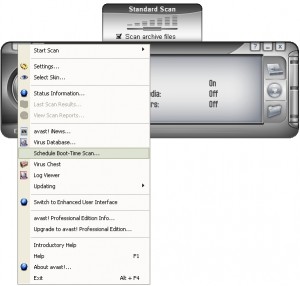
- Once memory scan finish, you can right click on the Avast anti virus window and select “Schedule Boot Time Scan”
- “Schedule Boot Time Scan” window will popup, select “Scan all local disk” and check on “Advanced Options”
- For normal infected file select “Move infected files to Chest” and select “No action” for system files and Press “Schedule” button.
- Avast will prompt you for restart to perform the Boot time scan and click “Yes” to reboot and start the scan.
- Done you have just scheduled a boot time scan from Avast anti virus
** Avast anti virus is a Free Anti Virus software for home user. It’s powerful yet free. Click here to read my review on Avast Anti Virus Software ***
Share this with your friends:-
Instead of pressing move to chest, i rather pressed delete all and it has made my laptop not to boot. What should do pls i need help.
I am not allowed to have a Scheduled Boot-time Scan despite the fact that I just performed a Quick Scan of My Entire Computer. Please don’t tell me that I need to have a Thorough Full-Disk Scan of My Entire Computer because that simply takes too long.
Hey I need help. When I do boot time scan some files in my windows software distribution folder show this:
windows\softwaredistribution\downloads\b4d3f318c0472b4e46c10ef46c486413\BITE24D.tmp|>oscintl-en-us.msp Error 42127 {CAB archive is corrupted.}
What does this all mean? What steps should I take?
i just instal avast anti virus, when i restart my pc, i can’t enter the windows, then out message that the instalation of avast anti virus was failure, how can i fix it if i cant enter the windows?
try to look for the virus chest.
if you cant get any files there then i’m sorry.
you should select “Fix” or “Move to chest” instead of “Delete”
I have done avast boot time scan on my laptop as selecting “2. delete all ” option. After that window start but this will not show me all my folders on disk, programs like nokia pc suite, .net framework, web browsers not working on my laptop. when i check my drive size it shows me acurate size that it aquires. During boot time scan i delete many files having the .exe and .scr files. So plz tail me how to get my folder view.
thanks and regards,
kishor choure
hi Carolyn, may be you can get some help from avast forum http://forum.avast.com/index.php
Avast indicated it detected a threat, caught it before any damage could be done. It suggested rebooting so it could perform a boot time scan. When the system comes up (old dell inspiron), i see the Dell splash screen then the screen goes black with a flashing cursor. I have a 1 GB hard drive as a system disk. The system progresses past the black screen (after running for 5 hours). It also will not boot into safe mode. How do i get my system to boot?
i had installed avast in my sstem….now when i start my computer, a blue scree appears….the copyright version of avast is shown, and then the system turns off….i cant start my system….and now, not able to format it either….please help
m comp is old amd athlon process
I can’t schedule boot scan before window start- that option is inactiv :\
My OS is Vista, I’m using free Avast Home Edition 4.8
Is it normal or my comp is infected?
PLEASE HELP
did avast detect any viruses during the boot scan?
If yes then it might caused by the virus removal.
After scanning my computer. MY desktop turned black and only MY documents window is available?.. what happened?.. please help.. Thanks
I want to run a boot time scan,… but part of my problem is that i cant start up avast or anyother antivirus, anti spybot, anit adware, anti malware, etc. programs. Not even in safe mode. This has never happend before and I’m really confused
I ran the Avast bootscan and now I cannot boot computer (Windows XP), the computer shuts down after first windows logo is displayed
thnx man i own you !!!!!!!!
Look ain avast website, schedual bootscan is grayed out, this function does not wok with vista 64x.
u mean u can’t install antivirus into your system?
try to boot your window in Safe Mode and install the Anti Virus.
You can get a free anti virus at below:-
http://www.techiecorner.com/102/avast-anti-virus-free-anti-virus-software/
sir i have a problem that i cant install my operating systim duo to virus then how i can be do boot scan plz advise
Scheduling Boot Time Scan in Avast requires Administrative rights.
Replace the first 2 steps above with the following:
1. Find Avast in your “Start Programs” menu.
2. Right-click on it and choose “Run as Administrator”, continue with step #3 above.
-Buck
64 bit is not supported on avast boot scan feature
I have same problem, but option Schedule Boot Time Scan is not enable…
I have full version of Avast antivirus…I dont understand 🙁
Help me!
My computer:
AMD Phenom(tm) 9550 Quad-Core 2.20GHz
DDR2 4GB
Windows Vista Ultimate 64-bit
Thanks very much 🙂