When you watch DivX/XviD movies in foreign language, you can turn on the subtitle in Windows Media Player. Before you can turn on the subtitle, you have to ensure you have the item below:-
Advertisements
- subtitle files with same file name as movie (just different extension) and put it in the same folder with the movie.
Example:
movie filename: c:\movies\my_movie_title.avi
subtitle filename: c:\movies\my_movie_title.sub - DirectVobSub Installed – the subtitle filter for Windows Media Player.
DirectVobSub is a DirectShow filter that used to display subtitle. Click here to download DirectVobSub. - Once DirectVobSub is installed, play your movie with Windows Media Player.
- While the movie is playing, Click on Play -> Captions and Subtitles -> On if available
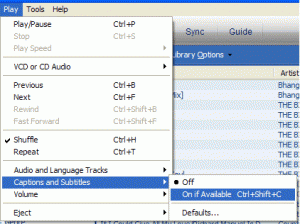
- Now your movie should have subtitles below the screen.
If you would like to download DivX movie subtitle, here’s the list of site to download movie subtitle:-
Enjoy your movies!
Share this with your friends:-
just dowlnoad windows windows 7 codec pack & Win7DSFilter Tweaker.
in Win7DSFilter Tweaker go to media foundation and check mp4 under ”disable for these formats
(32 bit)”.
after then go to MS Codec Tweaks and chek Disable Media foundation & Disable Media foundation 64 bit.
now all you need to do is matche subtitle files with same file name as movie
This one worked for me. Thanks a lot Jokner.
Jokner says:
March 23, 2011 at 7:36 pm
Vobsub / VSFILTER Alternative – Another way is Local Subtitles for WMP :
Subtitles Plugin for Windows Media Player allows you to play movies with subtitles in Windows 7 Media Player 12. This is a background plug-in for Windows Media Player. Its sole purpose is enabling textual subtitles, that accompany media files in formats not supported directly by Microsoft.
http://codecpack.co/download/Local-Subtitles-for-WMP.html
Didn’t work. Not sure why, but using .mp4 files and .sub .srt files aren’t being read by media player or media center. Sucks cuz it is Hellsing Ultimate…
hey
thanks a lot
Thanks a lot, a huge help 🙂
works perfectly !
thanks a lot man… =)
thanks dude..works perfectly for me
Hi,
I’ve done everything as instructed, but my problem is there is no “play” menu in my WMP, not while the file is playing, not anywhere! I’ve right-clicked over the entire thing, chosen all possible views, and I just can’t get to a menu that will allow me to toggle subtitles! What am I doing wrong?
Thanks man
works perfectly !!! Thanks.
Didn’t work for me
ada yang bisa tolongin saya gak,soalnya saya sama sekali gaptek.padahal udah coba ikuti petunjuk tapi tetap tidak bisa berhasil.rasanya kesel dan hopelesssssssss….
please help me.saya lagi ingin nonton IS,Jdrama.
The information on this website about making subtitle work in windows media player IS ON POINT!!!!!!! Thanks A Million!!!!!!
Thanks very much!! Worked perfectly!
Take care!
you are awesommmmmmmmmmme maan ! i was so terribly angry with this problem and YOU Mann solved it !!! THANKS 🙂 🙂 🙂
you are awesommmmmmmmmmme maan ! i was so terribly angry with this problem and YOU Mann solved it !!! THANKS 🙂 🙂 🙂
for those of you who still has problems, just open the video with “WINDOWS MEDIA CENTER” and not with “WNDOWS MEDIA PLAYER”.
Thanks a lot dude !!!!
bos,,,,!!! ni uda ku download n uda ku instal.. tapi kok ga bisajuga ya,,,,, ??? tolong donk…. gimana cara nya…??
Finally working after a long time of not being able to see subtitles on WMP 11.
I also had to make sure the subtitle had the same name as the movie title.
Wow it works!! Thanks 🙂
Thank you! I can fix the problem with subtitles in Windows 7×64 bit, just use the 32 bit version and works great!
I installed the 64-bit version as I have a 64 bit machine but it did not work. I removed it and installed the 32bit version and it worked like a charm!
Thanks for making life easier 🙂
thanks a lot!!! it’s really work DirectVobSub .. five star ^_^
IT DOESN’T WORK!!!!!!! AARRRGGHHHHHHH!!!
thank you! 🙂
Vobsub / VSFILTER Alternative – Another way is Local Subtitles for WMP :
Subtitles Plugin for Windows Media Player allows you to play movies with subtitles in Windows 7 Media Player 12. This is a background plug-in for Windows Media Player. Its sole purpose is enabling textual subtitles, that accompany media files in formats not supported directly by Microsoft.
http://codecpack.co/download/Local-Subtitles-for-WMP.html
Where do I have to place the Dll file, because it doesn’t work for me.
Thanks! Saved me just in time for showing a movie to class!
whoaaa…
so relieved coz can finallt watch the 3 idiots & understand it…
thanx!!! 🙂
There is a plug-in here:
http://sourceforge.net/projects/wmpsub/
Thanks dude!
thank you so much!!i was trying to find it for a long time!!!great job!!!!!!!
Very understandable guide.
some player support different name but some doesn’t.
try to have the same file name and it should work for most of the players.
Thanksx Dude,…it will helps 🙂
but how if the subtitle name different with the movie name? it still works?
i can do that on gom player and vlc media player.
holy crap!!! perfecto! COOL! directvobsub really works. great job dude. really sorry cant buy u a drink. :). but thanks.
KEEP ON ROCKIN!
thank u dude… 😉
Followed all the steps, have the file named exactly the same as the movie with .sub at the end of it, subtitles option is checked to on if available, i have K-Lite and DirectVocSub yet nothing works, still no subtitles on my movie, what do?
The movie is in mp4 format if that changes anything.
When I download subtitles the file is in .srt format. Will the process above also work if the file is .srt? Or does it have to be .sub?
Thanks alot mate! it helped 😀
What are you talking about??? There isn’t any….. Play -> Captions and Subtitles…..There is nothing that looks like that at all. I have a “now playing” “Rip” “Burn” “Sinc” and “Media Guide”…and that’s all. No file or any such creature.
Where is this ghost option??????????????
For .mkv you need the following splitter installed
http://www.free-codecs.com/download/Haali_Matroska_Splitter.htm
You will notice the matroska icon in the system tray when playing back .mkv. Right click it and choose the subtitle and audio stream.
Playing back an .mkv video outputs all subtitles, even when they’re speaking english, which I perfect understand and do not need a subtitle for. I’m thinking this is due to the creator of the .mkv not encoding only the subtitles for the foreing language, but all subtitles. (RE: maybe the source is bad) – happens on all of my mkv’s, however.
Any ideas?
Thanks
Thank you chua, it Works !!!
hi mike, the instruction will not affect your image and sound. It will only affect your sub title. if you play your file, it’s high possibility that you doesnt have the correct codec for it. U can try to install K-Lite codec (http://www.codecguide.com/) it bundle most of the famous codec in one installation.
Thanks i followed the instructions , but now when i play the movie in Windows Media player, it doesn’t show anything….No image , No sound , No Subs… why ??
thank you so much!
Thank you very much….
Installing DirectVobSub(VS filter) really helped…..
Thank you for article it works……But…i can’t resize the subtitles..,,i see it but its not big enough,,do you know if there is a way to make them bigger? ..stupid windows media ..always something.grr
Thank You!
Zoltan, to turn off subtitle in XP u can click on “Play” -> “Captions and Subtitles” -> “Off”. I havent tried Vista yet, do check if there is any options for u, if no then u can just rename the subtitles files to a different name to avoid it to play the sub titles
Thanks, it works.
However, the Media Player in Vista does not seem to have a turn on/off subtitle option.(or I just couldn’t find it)
thank you very much lad!!!
Thanks for the tip, mate! Worked wonders! 😀
Comment: at first it didn’t work, because the filename of de subtitle did not completely match de avi-file. Simply making de names equal did the trick. Thanks a lot
it works for me…thank you for sharing this~
It works well. It showed subtitles in my windows media player. Thank you for sharing
A very helpful guide. Thank you
thank you thank you thank you soooo much..I have been looking for ages how to do it..thank you sooooo much <333333
It worked…Thank you
A helpful guide.thank you.
Thank you so much! It works.
its not working. help anyone?
thanks…..
Thanks a lot, it works.
does not work. trying to play ff7 advent children in bluray on WMP because its the only player that streams the video without skipping on my 46″ TV. Cannot get subtitles to work. There is no individual file for the subs – Only a movie file, uploader file (trademark), and an MD5 file. Downloaded DirectVobSub and subs still will not player. Thoughts?
thanks alot