What is GMail plus addressing?
Do you know GMail allow you to have multiple Gmail email address, at the same time all the email will be delivered to the same inbox? This feature is called plus addressing.
How GMail plus addressing works?
You just add a plus (+) sign after your GMail address and all the email send to your new email address will be forward to your original email inbox.
Example: My main GMail account is mymail@gmail.com, now i add a new Gmail plus addressing address and i want use this email for all the forum i join. So i just change all my forum email contact to mymail+forum@gmail.com. Now, all the email send to mymail+forum@gmail.com will go into mymail@gmail.com inbox.
What’s the benefit of GMail plus addressing feature?
You can use multiple email address with only 1 email account. Just create different filter for your email and you can manage it easily.
How to fight spam with GMail plus addressing feature enable?
With multiple email address, you can easily find out which site or service send you spam. Just create a filter for the email address that spam you to trash and you will have no spam mail in your inbox.
How to create GMail filter?
– Login into your GMail account
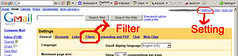
– Click on “Setting” on the Upper right corner.

– Click on “Filters” tab then click on “Create a new filter”.
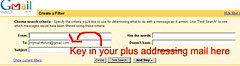
– Then fill in your plus addressing email in “To:” and click “Next Step >>”
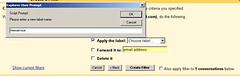
– you can choose what to do with your email. I recommend “Apply the Label:” (if you do not have any label yet, you can create one instantly and apply to the label)
– Once finish, you click on “Create Filter” and it’s done!
So next time i when i want to read certain group of email, i’ll click on the label at the left navigation bar and it will show all my label email.
Sound Cool right?
[tags]gmail, plus addressing, email, email feature, free email address, unlimited gmail account, fight spam, spam, prevent spam, tutorial, web tips, tips, tricks[/tags]
Nevertheless, in my experience, 9 times out of 10 they refuse to accept the ‘+’ address. From banks to newsletters, I have rarely seen this work.
i nee a gmail soon
“+” is a completely valid character in an email address as defined by the internet messaging standard published in 1982 RFC 822 pp8-9 ( http://www.faqs.org/rfcs/rfc822.html ). Any email client that refuses to use the “+” sign is not following the standard and prohibiting you from tracking your email correspondence.