 By default Skype save your call n chat in history. But, You can delete those call history in Skype. Of course, some of you might want to delete the call history due to some privacy reason. Here’s i’ve included the way to delete skype call history in Mac and Window platform.
To delete call history in Skype (Windows), follow the steps below:-
Advertisements
- Start and Login to your Skype
- Click on Tools -> Options -> Privacy Settings Tab -> click on “Clear History” button.
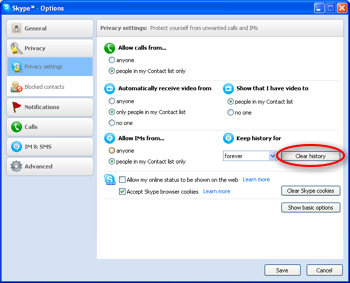
- Pop up window will appear for confirming the delete of call history, just confirm and your call history in skype will be deleted.
For Mac user, here’s the steps to delete call history in Skype:-
- Start and Login to your Skype
- Click on Skype -> Preferences -> Chat tab -> click on “Clear History” button.
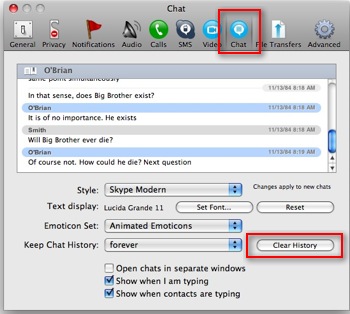
- Pop up window will appear to confirm the deletion of call history. Just confirm and all the call history in skype will be deleted.
Related posts:
How to disable notification center in Mac OS X
How to format external hard disk for Mac and Windows
How to extract copyright DVD in Mac - MacTheRipper
How to install apache, php, mysql with macport in Mac OS X
How to convert doc to pdf in Mac OS X
How to convert flac to mp3 file in Mac OS X
How to open .mdi file in Ms Office 2007
Mac: How to setup email account in Apple Mail
Share this with your friends:-

To delete messages off one or some contacts, do a search for
“Delete Skype History Standard Edition”.
It clears chats, calls, or whatsoever whithin a time range you choose with youe chatting partner.
CLEAR HISTORY IS GREAT. SAME PROCEDURE USED IN FOX !
That deletes the chat history, not the call history.
How do I delete a a conversation off just one person ? i still want my other conversations form myfriends except just from that one
I WANT MY ACCOUNT DELETED