 A friend ask me, how to resize image in Mac without install 3rd party program. Actually the default image viewer in Mac (Preview) can be use to resize image. Not many people know Preview can be used to resize image, and perform some simple image processing like adjust color, flip image, crop image and etc.
To resize image in Mac OS X, follow the steps below:-
Advertisements
- Open your Finder -> double click on the image you want to resize
- Now Preview will launch n show the image you double click
- Click on Tools -> Adjust Size, a Image dimension window will pop up and you can enter the size you want here and the image will be resize!
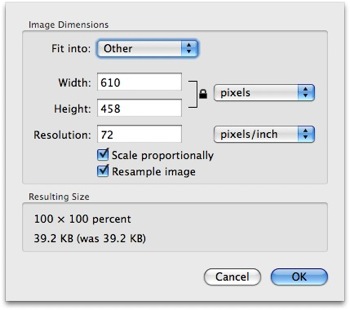
- Once the image resized, you have to save your image by click on “File” -> “Save as” and enter a file name for your new image. If you decided to overwrite the image file, then you can click “File” -> “Save” or press Command + S
Share this with your friends:-
Many Thanks, keep it up.
Thanks for putting this information together, hugely helpful. Keep up the great work 🙂
For resizing I prefer this one http://rawimaging.org/projects/image-resizer
Far more options
This is not useful at all, there’s is NO ” resize image” or any choice to enter pixel under my preview tool menu. Why?? I’m using mac tiger! I need to size a pic to exact dimensions but I cannot find a way to do it!! Its rubbish
Wow, great tip. Thank you. The only image processing I require is resizing and cropping. Using the Preview is a great way to accomplish this. Thanks again.
¡Muchas gracias!
Pure Magic. I’d been using this without knowing what I was doing.
Thanks
This was very informative. I was pulling my hair out trying to use aperture and Iphoto
Thanks a bunch. Saved me a crap load of time.
Thanks for the article, it was very informative!