
I’ve just installed Skype for Mac. Since then, everytime i start my Mac, Skype will auto start. I hate application tat auto start without user permission. I’ve look for some way to disable Skype auto start feature.
To disable Skype auto start in Mac, follow the instruction below:-
Advertisements
- Start your Skype
- Right click at the Skype Icon at your Dock / Taskbar
- Select “Open At Login” to uncheck the tick
- Done, you have just disable Skype from auto start
Here’s the 2nd method to disable Skype auto start in Mac:-
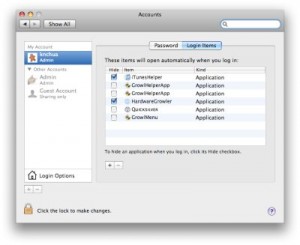
- Go to System Preference -> Accounts
- Select your account at the left column
- Click on “Login Items” tab
- Highlight Skype and Click on the “-” button
- Done, you have just disable Skype from auto start
Happy skyping 🙂
Notes: Skype allow you to make Free Internet Call with other skype user. Besides, they also offer cheap international calls and sms.
Share this with your friends:-
THE SOLUTION IF THIS DOESN’T WORK FOR YOU : these two methods didn’t work for me. so i checked ‘open at login’ (it used to open without it being checked), restarted, and skype lauched. then i unchecked the ‘open at login’ option on the dock option, restarted and skype stayed down. solved!
No, doesn’t work for me either, ‘open at login’ was already unchecked and it does not appear in ‘login items’, and it STILL opens. Maybe it doesn’t work with Macbook Air?
Doesn’t work for me… still autostarts without permission even when I supposedly disable from Login items and disable “Open at Login” by control-clicking the dock. Very frustrating because I think Skype interferes with a lot of my startup web logins and delays the process of loading up everything.
Small things can make a big change! Thank you so much for my peaceful mind today…Namaste
Thank you!!!
Funny I Googled “auto launch and Mac” and ironically your post was at the top of the list and Skype was exactly what I wanted to fix. Thanks.
Thank you. This has been annoying for a very long time and just got to that point where I needed to search for help on how to disable.
I keep forgetting about right clicks on the dock for options.
Thank you!!! Was easy to find and follow. Searched via Google. I love Skype but this was very frustrating. Thanks for your help.
Thanksabunch – as usual, I found the easy way of configuring mac-programs through google 😛
thanks for posting this! skype’s site stinks for finding this little tidbit and google brought me here.
Sweetness! Thanks so much. I love skype don’t get me wrong, but I just can’t stand things opening at login.
Thank you¡¡¡ It was very very anoying you saved my mental health
thanks!!!
Thank you!
I was so annoyed and and angry that it wasn’t easy to take of,
looked everywhere in preferences,
nearly uninstaled Skype..
Awesome, thanks for the fix. I found the auto-start very annoying
Perfect! Just what I was looking for. Great relieve. Many thanks!
THANK YOU THANK YOU!!!
I searched and searched.
Love it.
Cool, thanks for the tip!
THANKS VERY MUCH, I LOOKED FOR IT IN SKYPE PREFERENCES AND COULDN’T FIND IT!
THIS POST SAVED ME AND MY IMAC.
Many thanks! Such a small thing but I got annoyed with it… it reminded me too much about my PC years when there’d always be lots of unnecessary things going on without my permission.
Now Skype is off and I turn it on when I want 🙂
great! i’m starting to like OSx!
Thanks a lot. I to belong to those guys annoyed by the Skype at Startup. Damn, the user should have the choice to select the apps he/she wants! Thank you for the help.
Oh thank you!!! It was also starting to annoy me. Did not know the Mac OS way to disable sign-on at startup. It was so easy that I did not think of it at all 😉
Cheers
Thanks a ton! This has helped me from stop thinking about one of the many things that intrigue me. :-). But this skype issue was also actually bothering me.
Thanks once again.
Thanks a lot! It’s a shame for Skype to use this kind of tricks to keep their app running on the background. This backfires to them by annoying the users and ending up with a bad reputation for their brand. Why not to simply put the option in the preferences – place where 99% of users would search for it? FAIL!!!
Thank you! That was SO annoying!
thanx! this was annoying me a lot!
THANK YOU SOO MUCH – IT HAS BEEN ANNOYING ME FOR MONTHS NOW>
Thanks for the post. I too hate the presumption of applications that auto install themselves like that.
Thank you, I was about to remove this app.
Thank you SO much! You have no idea (okay, well, maybe you do LOL) how much this was bothering me just now!
THANK YOU!!!!!!!!
Thanks alot man my dad was getting pissed and was trying to figure out how to delete it.
Well, the problem is always there for me: I deleted Skype from the Login Items AND disabled the Open at Startup right-clicking the icon on the dock. Skype doesn’t auto starts anymore until I launch the application once again, then Skype puts itself back in the Login Items EVERY TIME!
Thanks, drove me nuts looking for it in ‘Preferences’ !!! So I learned something new today! Thanks!
Thank you !!!! I had disabled skype from the “login items” and it still kept popping up everytime I logged in ?!
But right-clicking the icon on the dock trick worked 🙂
two years after the original post this is still super helpful…thanks! I was going nuts trying to turn it off!!!!
Thank You!
Skype is giving me headache where to disable this and I found this site. Thank you so much!
Thanks for this. Worked like a charm. 😀
thanks! i was googling all over for this answer!
lol i love how this was the 4th hit on google for “mac os autorun menu”
heheguess alot of people have this problem
AWESOME BEN LOOKING FOR THIS EVERYWHERE THANK YOU !!!!
good job! thanks!
very helpful !! thank’s to people like you..
It’s hilarious that we the technologically educated can’t even find the disable auto-start preference.
Thanks for this. It’s humbling. ^__^
Thank you so much, I just wanted to stop skype from opening, because every time I try to delete the program it gives me an error message. Thank you a million times.
Thanks so much…this has been driving me CRAZY for months!
Thanks a lot man…
Mil gracias…!!!!!!! me tenÃa “enferma” lo lento del inicio ….GRACIAS….
hey,. thanks I’ve been looking for this option for quite a time… Skype should really disable this option by default 😀
thanks! I was going razy to find this fu***ng options 😀
it’s quite funny, i googled ‘auto start mac’, and this was the first link: ‘How to disable auto start in mac’ 🙂
I wonder if skype ever feels sad about this.. 😛
Thank you. You’re the man!
Skype is horrible. It’s like a virus. Once you get it on your computer you can’t make it go away. It just keeps popping up on your screen and there’s nothing you can do about it.
The engineers at Skype should be thrown in jail for creating this horrible auto start feature that is so hard to turn off.
Everyone should stay away from Skype!!!
Thank you. Don’t I feel dumb for not figuring that one out. Cheers.
Thanks You! This skype autostart was driving me crazy
thanks so much! it’s annoying that skype makes it so obscurely difficult to do one your own without having to turn to online forums. …but that’s what also makes forums like this great.
Thank you! I’ve been trying to figure this one out for a while. Huge help!
I would like to know how to get rid of all the usernames that comes up when I go to sign into Skype. I sometimes have to talk to someone without a certain person knowing that all I’m doing is making new accounts, because they keep appearing when I go to sign in! There is no options for auto complete on Skype. Why??
Thanks, I feel like a dumbass now. 🙂
THANK YOU THANK YOU THANK YOU! That was easy =)
B. Ray,
Next time you see the drive, quit skype (if it’s running) and open the drive. Drag the Skype application from the drive to your desktop (or Applications folder). Then eject the drive.
If that doesn’t work delete all Skype files and download it again and start afresh.
-N
Thank you very much. It was really helpful for me.
thanks but…… I STILL get the SKYPE icon showing up as a “drive” (?)
When I drag the icon to the trash it turns into an arrow and “ejects” it, but when I restart the computer it shows up again.
When I run spotlight and try to delete the application (by draggin) it gives me an error code or “-61”..
any thoughts? I HATE Skype (now) and will never use it
So glad you posted this and it came up #1 on a Google search. I just installed Skype yesterday and was already frustrated that it has auto opened twice. Thanks!!
Thanks so much, I wasn’t smart enough to work it out my self!
THANK YOU
Thanks!!!!!!
Thanks a lot!
Thanks 🙂
i think they should add the “open at login” option on its preferences
huh!
Thank you very much! This helped out a lot.
Very unfortunate that they seem to sort of hide that setting for us “normal” users 😛
Thanks a lot though!
really really appreciate it! life saver! skype was really annoying me! thanx again 🙂
YES YES YES YES! Thank you. This is what we needed. So annoying!
thank you soo much…i was pissed to always see it happen without MY PERMISSION ! GRRRRRRR…thank you thank you
thank you!! I’ve always found the auto start so annoying. thanks for the simple directions.
Thank you! I was looking for a way to turn off this “auto-on” and the skype forum’s moderator were useless at telling me how. Thankfully some nice person put a link to your article. Excellent. Thanks so much!
Don’t we all feel retarded, now… what’s your skype name, I’ll upload you some I.O.U drink vouchers
THANK YOU! i looked all over the Skype menu options. glad you posted this.
Thanks man, really easy to do but I almost get myself an eye dropped looking for this skype startup disable.
Tks again