 One of my colig complaint his Open Office Calc Worksheet tab went missing. I’m not sure how he manage to hide the worksheet tab. But after some reading at Open Office forum, i found the solution to show the Calc Worksheet tab again.
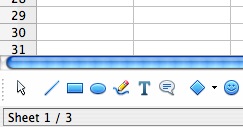
This is how it looks when Worksheet tab is missing:-
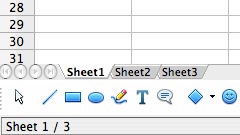
This is the normal view with worksheet tab visible:-
If your Open Office Calc Worksheet Tab went missing, follow the steps below to enable it:-
Advertisements
- Open a file in Open Office Calc
- Window: Click on Tools -> Options -> OpenOffice.org Calc -> View
Mac: Preferences -> OpenOffice.org Calc -> View
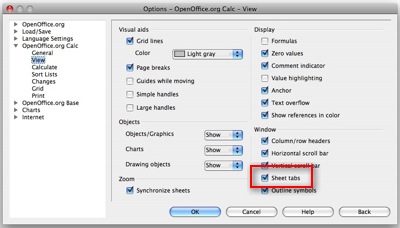
- Tick the “Sheet Tabs” and click “OK” button
- Now you should see your Worksheet Tab in your Open Office Calc.
Related posts:
Free spyware cleaner - Spybot - Search and Destroy
How to hide .svn folders in Eclipse or Aptana
How to loop thru directory files in bash shell
Fckeditor - File Manager Session Problem in IE7
How to encrypt my files in Mac OS X?
How to use apt to list available packages?
Word cannot start the spelling checker - Word 2011
How to disable javascript in Adobe Acrobat Reader
Share this with your friends:-

Thanks! I would not have guessed this toolbar is optional!
thanks! i was starting to get pissed that my tabs were missing. Thanks again!
Thanks for the tip. I’m not sure how I made my worksheet tabs disappear; it either had to do with my constantly resizing the window or I inadvertently hit whatever keystroke combination that makes it happen. In any event, in order to make this tip work, my sheet tabs selection already had a tick mark in it, so I first had to un-tick it and click OK, then re-tick it and re-click OK. Problem solved. Many thanks!