 When you click forward email in Thunderbird, it will forward the email as attachment by default. You can set the default forward type as inline in Thunderbird. So next time whenever you forward email, it will forward as inline. Sometimes when you forward email as attachment, some recipients might not able to read the email. So, to solve this, set your Thunderbird to forward the email as inline.
To enable forward email as inline in Thunderbird, follow the steps below:-
Advertisements
- Start your Thunderbird, Click on Tools -> Options (* If you are mac user, click on Thunderbird -> Preferences)
- Options window popup, now click on Composition tab and -> select General tab
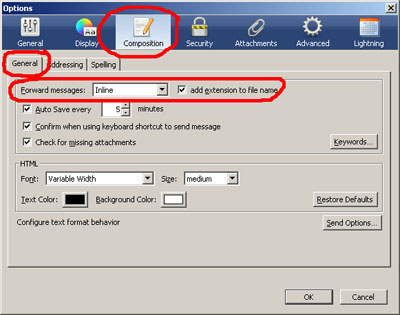
- You will see “Forward messages: ” and click on the drop down box and select “Inline” and click “OK” button
- Now you can try to forward a mail and the content will be forward as inline by now.
Related posts:
N900: How to connect Wifi protected setup compliant Network
How to extract copyright DVD in Mac - MacTheRipper
How to Backup Outlook Express email
How to disable auto start for Windows Live Messenger
How to stop faces scanning in Picasa 3
How to enhance and increase battery life for N900
Free SVN Client (GUI) for Mac OS X - SvnX
How to find duplicate photo in Window 7 / XP
Share this with your friends:-

The update will never come. I’m switching over to Outlook, I’m sick of not being able to forward emails with effing TEXT staying as text. Not that hard.
Inline attachment no longer works for forwards resulting from a filter .Msg goes with .eml regardless. Do you have a tip or do I just wait until the updates cure the bug?
Tnx