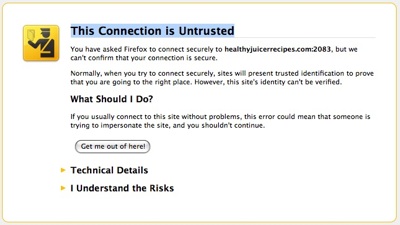
 If you are browsing a https site your might see this message in your firefox: “This connection is untrusted”. This message doesnt mean the connection is totally untrusted or the site is trying to trick you. This is because firefox not able to verify the certificate with the website.
Advertisements
Normally you will find this message if you are trying to access your own webmail thru https at CPanel hosting.
You can avoid “This connection is untrusted” by following the steps below:-
- When you see “This connection is untrusted”, click on “I Understand The Risks” and click on “Add Exception” button
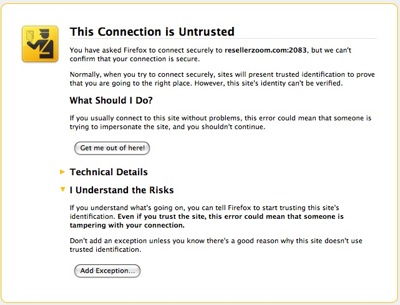
- Once click on the “Add Exception” button, a pop up window will appear, Click on “Get Certificate” button and then click on “Confirm Security Exception” button.
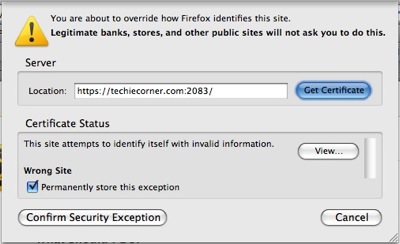
You might also tick the “Permanently store this certificate” to avoid this screen again for the next visit.
* For more information regarding “This connection is untrusted”, visit the mozilla knowledgebase
Related posts:
How to create Table of Contents in LibreOffice
CPAN Error: make test had returned bad status, won't install without force
How to check Zimbra Version without ssh access?
How to add calendar in Thunderbird - Lightning Calendar add-on
How to enable email notification in Adium?
How to clear play history in VLC media player
Free Project Management software for Mac OS X - GanttProject
How to auto compact Email folder for Thunderbird Email Client
Share this with your friends:-

i think your Window date / time settings is not right.
If your PC timing will be reset whenever your computer reboot,
then may be you want to check your PC CMOS battery.
The message I get doesn’t even allow me to add the exception it only gives me the get me out of here option. I am very disgusted with this. It happens very often and I have to restart my computer to make it go away. PLEASE FIX THIS PROBLEM! Thanks.
I am running the latest version of Firefox and windows 7. I also use McAfee. the message I get doesn’t even allow me to add the exception it only gives me the get me out of here option. When I add the exception in the security panel it still doesn’t work. I can’t access my Etsy eCommerce site to respond to customers at the moment.
fortunately IE works.
I prefer Firefox and support the organization… but this is a real showstopper
I am running Window 8 64 bit with FF 22. Couldn’t get rid of the “Untrusted Site” message until I removed “BrowserGuard” from the PC. Good luck.
ty mashit hassan
hi Durbesh Kumar,
u can also check if your computer time is accurate.
if it’s not accurate, adjust it and u should be be able to avoid this message
dear sir
my connection is untrusted please reply soon shutout my problem
hey i have my own antivirus which protects me from untrusted connections. i don’t have to add an exception in every page i try to access using your browser. i can’t even open yahoo, Facebook unless i add them to an exception sites list and i think this is a boring task to do specially at this stage where life has become very easy
after long troubleshoot….its all because of system date setting, update it
You just have to reset your system date & time to get rid of it.. make sure its current date & time..
Thanks!!
Thanks, This Suggestion. It very helpful
This ridiculous. I get this error every time I try to create an online account with one of my suppliers, and often when trying to log into my supplier accounts. I know these are legitimate websites of legitimate businesses and I know they are secure. I don’t care about their certificates. At this point they aren’t doing any good as a security measure anyway. Often I need to create an account quickly when I need supplies for a custom order and I don’t have time to deal with the stupid error message. After filling out my info and clicking on the button to submit and create my account I get this message and loose the data I just entered. I don’t have time to do it again today, I’ll just have to order over the phone. Maybe I’ll try again next week. But I forget and have the same problem then. It costs me time and money for absolutely NO REASON!
I see no need for a warning when there is no danger on a secure site. STUPID! STUPID! STUPID!
it is very important and thank you very much
Firefox team really screwed up badly with SSL.
The browser should notify us of errors, but not otherwise cripple our productivity in untrusted connection dialog boxes.
They don’t understand that sometimes users don’t care if SSL is valid or not, they just want to open a web page. HTTPS with expired cert is no worse than plain HTTP…. Training wheels is a great analogy, firefox is killing usability for no good reason??
Luckily there are some FF plugins to get out of the HTTPS hell firefox is responsible for.
Look for “New MitM Me (Cert Error Bypass)”
Unfortunately is less secure than if firefox had done it right in the first place.
@reggie:
Thanks for the tip! I probably wouldn’t have noticed that my system reverted to 12AM January 1, 2002 until much later. hahaha
I had the same issue, tried everything. It was nothing to fix once that light bulb went off in my head.
check the date on your cpu. If Cpu date is off the certificate we not work. go to time and date and change it.
Lame move, Firefox. We don’t require training wheels on our browser that CANNOT be removed.
IE and Chrome suddenly look pretty damn good. Best of all, the exception is temporary and removed after you close Firefox, so you get to do it all again next time.
“This Connection is Untrusted
You have asked Firefox to connect
securely to addons.mozilla.org, but we can’t confirm that your connection is secure.”
Yes, can’t even logon to mozilla without these false warnings. We’ve gone back in time to the bad old days of M$ and their “general fault” errors of old.